
Documentation
How Cooper&Wright is installed, what it reads and writes, where each of its three loops stops, what it learns, and how to take it out again. The landing page makes the case; this page states the terms.
Overview
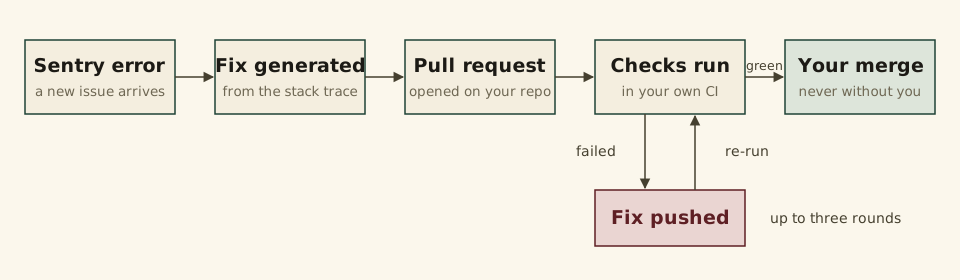
Cooper&Wright is a Sentry integration and a GitHub App. When a new issue reaches a Sentry project you have mapped, it reads the files in the stack trace, generates a fix with Claude, opens a pull request, and then watches that pull request's checks and repairs what fails, round by round, until the checks are green or its budget of three rounds is spent. The same repair loop runs on the pull requests people open in a repository you flag, and on Dependabot's, which it also merges once they are green.
Its unit of work is the pull request that lands. Everything on this page follows from that: what it needs access to, where each loop stops and hands back to a person, and what it keeps from the fixes you ship over its own.
- Runs
- In our cloud, as a GitHub App and a Sentry integration. There is nothing to install in your repository or your CI.
- Stacks
- Laravel, Rails, Django, FastAPI, Flutter and dozens more: every Ruby, PHP, Python, JavaScript and Node, Dart, Go, Rust and JVM project Sentry knows.
- Merges
- Dependabot's pull requests, where you turn that on. Its own fix PRs and the PRs people open wait for you unless you say otherwise, per repository.
- Price
- Free while in beta. No card.
How do I install it?
Install the Sentry integration and the GitHub App, then map a Sentry project to a repository. Sign in with GitHub first: the dashboard is where the Sentry connection is started and where the mapping is made.
1. The Sentry integration
Install Cooper&Wright into your Sentry organization from Sentry's Integration Directory, from the dashboard's "Connect Sentry" button, or directly from the external install link:
https://sentry.io/sentry-apps/cooperwright/external-install/
Sentry shows the permissions listed under What can it read and write? and asks you to approve them. On approval it sends you back to Cooper&Wright, which exchanges the one-time grant for an installation token, confirms the installation with Sentry, and stores one connection per organization. In the same request it mirrors the organization's projects into the mapping picker, so the picker is full before the page loads. The list is re-read every thirty minutes and whenever you press "Refresh projects"; reinstalling for an organization already connected renews that connection rather than adding a second.
2. The GitHub App
Install the Cooper&Wright GitHub App, from the "GitHub App" card on the Repo Mappings tab, on the account that owns the repositories you want fixed: your own, or an organization you administer. The repository picker offers only the repositories of the installations you made, read through each installation's own token: a mapping to any other repository would produce incidents whose pull request could never be opened. Install on as many accounts as you like; a repository granted later appears after "Refresh projects" or within ten minutes.
3. The mapping
A mapping joins one Sentry project to one repository. It is made once, on the dashboard's Repo Mappings tab, and every switch in Switches and limits is set on it.
| Field | What it is |
|---|---|
| Sentry project | One of the mirrored projects. A project maps exactly once. Leave it empty for a repository you only want PR monitoring on: such a mapping never opens a fix PR. |
| Repository | From the GitHub App's list. A repository may be mapped many times — once per Sentry project — but only one of its mappings may carry PR monitoring, and only one Dependabot auto-merge. |
| Branch | The branch fixes are cut from and pull requests opened against. Defaults to main. |
| Subdirectory | For a monorepo: the directory the Sentry project's application lives in. Paths in the stack trace are resolved under it, and a monorepo is mapped once per Sentry project and subdirectory. |
| Stack | Which framework's guidance Claude writes the fix under. Chosen by hand; pre-filled from the Sentry project's platform where Sentry names one (ruby-rails, php-laravel, python-fastapi, Dart and Flutter, Go, JavaScript and Node, Next.js, Django, Java and Kotlin, Rust). After the mapping is saved the repository's own manifests are read and the settings card says when they disagree with your choice. |
The manifest check reads one directory listing and recognises, in this order of precedence: pubspec.yaml as Flutter, Cargo.toml as Rust, go.mod as Go, composer.json as Laravel, Gemfile as Rails, pyproject.toml or requirements.txt as FastAPI, and package.json as JavaScript only when none of the others is present, since a Rails or Laravel application ships one too. The check is evidence beside your setting, never over it: nothing changes until you press "Use" on the hint.
What can it read and write?
In Sentry it reads your organization, projects, issues and events, and writes one thing: an issue's resolved status. In GitHub it reads code, checks and job logs, and writes commits, pull requests and merges. Each permission is listed below with its reason. The scopes themselves are Sentry's and GitHub's, described in Sentry's integration platform documentation and in GitHub's permissions for GitHub Apps.
The Sentry integration
| Permission | Access | Why |
|---|---|---|
| Organization | Read | To name the organization the connection belongs to. |
| Project | Read | The project list the mapping picker is filled from, with each project's platform for the stack pre-fill. |
| Issue & Event | Read and write | Read: the issue and its latest event, because the webhook that announces a new issue often omits the full stack trace. Write: one call, to mark the issue resolved in Sentry once the fix pull request has merged, or once you mark the incident as fixed elsewhere. Without write access those resolutions silently do nothing. |
| Webhooks | Issue events | created starts an incident, resolved closes one. Sentry's own installation event tells us when you uninstall. |
The GitHub App
| Permission | Access | Why |
|---|---|---|
| Contents | Read and write | Read the files a fix needs; commit the fix to a pull request branch; merge where you have turned merging on. |
| Pull requests | Read and write | Open, update and merge pull requests. |
| Checks | Read | Check-run results: which check failed, and whether a pull request is green. |
| Commit statuses | Read | The older status contexts some CI systems still report through. |
| Actions | Read | The failing job's log, so a CI fix is written against the actual error rather than the check's name. |
| Administration | Read | Branch protection, for the "required checks only" merge gate. Without it that gate falls back to "all checks". |
| Workflows | Read and write | Only to merge a Dependabot pull request that changes a workflow file, which GitHub refuses otherwise. A merge refused for this reason is parked with the reason on its row and retried on its own once the permission is granted. |
| Webhooks | Events | pull_request, check_suite and workflow_run: a PR opened, a suite finished, a run finished. Every one is also polled for, so a missed delivery is caught within minutes. |
What it reads
For a Sentry fix, the files named in the stack trace's in-app frames, resolved under the mapping's subdirectory. For a CI fix, the files the pull request changed, the failing checks with their annotations, and a bounded tail of the failing job's log. From there, whatever it asks for through its two repository tools while it works, both read-only:
- read_file
- The contents of one file at the branch being fixed.
- list_directory
- The entries directly under one directory. One level, like ls.
At most five such rounds per fix, after which it must answer with a patch or decline.
When a fix changes a dependency manifest — a Gemfile, a package.json — Cooper also fetches a snapshot of the branch at that commit (GitHub's archive of the repository, the whole tree) and regenerates the lockfile from it on its own resolver service, so the manifest and the lockfile land in the same commit. The snapshot lives for that run, minutes at most, on infrastructure Cooper operates, and is deleted when the run ends: nothing from it is stored, and nothing leaves that infrastructure except the package registry lookups the resolver makes (rubygems.org, registry.npmjs.org, pub.dev). The resolver holds no credential of yours; the snapshot is fetched with a one-time link and handed over without one.
What it writes
Its own pull request branch, named cooper-and-wright/fix-…, or the branch of a pull request you asked it to watch. It never commits to your default branch, with one exception: to make Dependabot rebase a conflicted pull request — Dependabot ignores @dependabot commands from bots and GitHub Apps — it commits a one-line comment to .github/dependabot.yml on the default branch, marked [skip ci], at most once per pull request and once per repository every fifteen minutes. Where a ruleset refuses that direct commit, it opens a pull request for the same change instead and merges it once green.
Where the fix is generated
Fixes are generated by Claude, through Anthropic's API. Each request carries the error's title, its stack trace and in-app frames, the contents of the files listed above and any it read through the tools, the failing check and log tail for a CI fix, the lessons that apply, and its own earlier attempts on the same pull request. Your Sentry and GitHub credentials are never part of a request; nor is anything from any other customer. File contents travel as they are, so a secret committed to the repository would go with its file — which is one more reason not to commit one.
Where does each loop stop?
Each loop stops at a pull request waiting for your merge, or after three fix rounds, when it hands the pull request to you. Only Dependabot auto-merge merges on its own; the other two merge only where you turn auto-merge on. Three loops, one GitHub App, each turned on per mapping. They share the repair loop — the CI fix rounds, the self-check before every push, the budget, the hand-off — and differ in what starts them and what may merge.
| Loop | Starts when | Does | May merge |
|---|---|---|---|
| Sentry fixes | Sentry reports a new issue in a mapped project. | Generates a fix, checks it, opens a pull request on its own branch, then repairs that PR's failing checks. | No, unless "Auto-merge Cooper's fix PRs" is on for the mapping. It is off on every new mapping. |
| PR failure monitoring | A required check fails on a pull request a person opened in a repository with PR monitoring on. | The same fix rounds, pushed to that PR's own branch. | No, unless "Auto-merge human-opened PRs" is on. Off by default. |
| Dependabot auto-merge | Dependabot opens a pull request in a repository with Dependabot auto-merge on. | Repairs its failing checks, resolves its merge conflicts, and merges it once green behind the merge gate. | Yes: that is the loop. |
The budget
Three fix rounds per pull request. A round is one generated patch that passed the self-check and was pushed, or one that was refused twice and pushed nothing. A Dependabot merge conflict resolved by Cooper's own merge commit spends a round too. Pressing Retry on a PR's page gives it a fresh budget of three.
The hand-off
When the budget is spent, when the fix would need something Cooper does not do — regenerate a lockfile for an ecosystem its resolver does not cover yet, delete or rename a file — or when it declines to guess, the pull request is marked as needing attention. The reason is written on its row, nothing is pushed again until you press Retry, and the PR is listed in your next attention digest (see Notifications). A Sentry incident whose first patch fails the self-check twice is failed rather than opened as a PR.
The merge gate
Where merging is on, a pull request is merged only when its head is green by the mapping's gate, and the merge is pinned to that head so a commit landing in between makes GitHub refuse rather than merge something unseen. The merge method is the repository's own setting.
- all_checks
- Every check run has completed and passed, every commit status is success, nothing is still pending, and at least one check or status exists: a repository with no CI never auto-merges.
- required_checks
- Only the base branch's protection-required contexts count, and every one must have reported and passed. Where no required set can be read — no protection, or protection requiring nothing — the gate falls back to all_checks rather than merging on "nothing required".
Dependabot conflicts
A Dependabot pull request that GitHub reports as conflicted climbs a short ladder. While only Dependabot has pushed to it, Cooper nudges Dependabot to re-check and rebase (the dependabot.yml commit above) and waits fifteen minutes. If a lockfile is what conflicts, the PR goes to a person: a Dependabot PR's whole change lives in the lockfile, re-locking against the base branch would drop it, and only someone with push access can tell Dependabot to recreate the PR. Anything smaller is resolved with a merge commit of Cooper's own, which spends a round; if that fails, the PR needs attention.
Lockfile conflicts
A pull request a person opened whose lockfile conflicts with the base branch is resolved the way a person would resolve it: the base branch merged in, and the lockfile regenerated from the merged manifest on Cooper's own resolver — bundler, npm and Dart today — rather than text-merged or written by Claude. One merge commit, one round spent, and the regenerated lockfile is its own step on the PR's timeline. A lockfile of an ecosystem the resolver does not cover yet goes to a person as before.
What is checked before a push?
Cooper checks its own patch for diff residue, syntax errors and its lessons' rules before anything is pushed, in every loop. The check runs on the contents each file would have after the patch is applied, before any branch or commit exists, so a patch it refuses leaves nothing behind in your repository. Three kinds of rule, in this order.
Residue
An added line that is a unified-diff header, a hunk header, or a merge conflict marker — diff --git a/, --- a/, +++ b/, an @@ hunk header, <<<<<<< or >>>>>>> with a label — is a finding in every language and needs no tool. A bare --- (front matter) or ======= (a heading underline) is not.
Parse
Each file is parsed by the parser for its own extension, never by the mapping's stack: a JavaScript file in a Rails repository goes through Node, a Ruby file in a Rust repository through Ruby.
| Files | Parser |
|---|---|
| .rb | ruby -c |
| .php | php -l |
| .py | python3, ast.parse |
| .dart | dart format |
| .go | gofmt -e |
| .js, .mjs, .cjs | node --check |
| .rs | rustfmt --edition 2021 --emit stdout |
Each parser has fifteen seconds per file; running out of time is a finding. A file whose extension has no parser is skipped, and so is a parser that crashes rather than names a line — a real syntax error always names one — so a tool falling over cannot refuse a good patch.
Lessons
Every lesson injected into the request that carries a pattern is run over the lines the patch adds, with the lesson's own message as the finding (see Lessons).
What a refusal does
A patch with findings is not pushed. Claude is asked once more, with the findings and the refused patch in hand, and the second patch is checked the same way. If it passes, it is pushed as the round; if not, nothing is pushed and the round is spent: a CI-fix attempt is recorded as failed on the PR's timeline, and a Sentry incident is failed rather than opened as a pull request. Two further refusals do not depend on the check at all: a patch that deletes or renames a file is not applied, and a hunk whose context cannot be found in the file — it is placed where its text is, never where its header claims — fails the round with that reason.
Lessons
When a person fixes what Cooper could not, Cooper reads that fix against its own and writes a lesson. The lesson rides into its next fixes as a rule, and where it carries a pattern, as a gate.
When a lesson is written
- Overruled
- A watched pull request merges after Cooper gave up on it, or with a person's commits pushed over Cooper's. The fix is the newest commits after Cooper's last push.
- Fixed elsewhere
- The Sentry issue is resolved while Cooper's pull request is still unmerged, or a person closes that PR. The fix is looked for in the default branch's commits, on the files the error and Cooper's patch touched, between the fix and the resolution.
A person's fix is one that is not Cooper's, not another bot's, and not a merge commit — an "Update branch" click would otherwise arrive as the whole base-branch delta labelled as the fix. Lockfiles and generated files are dropped, and each side is capped at two hundred lines.
What a lesson is
One call to Claude distils the pair into three parts, kept as written and never edited by hand:
- Summary
- What Cooper did, what the person did, and the difference. For you.
- Rule
- One line, for future requests on the same repository.
- Check
- Optional: a pattern run over the lines Cooper's next patch adds. A pattern that does not compile, runs too long, or would not have caught the original patch is dropped rather than trusted.
Each fix request carries up to five of the repository's own lessons — scored by whether they touch the same files, whether the failure reads like their category, and how recent they are — plus up to three house rules from the ladder below.
The ladder
- Repository
- Where every lesson starts: the repository that taught it.
- Stack
- A second repository on the same stack teaches the same rule, and the lesson is promoted to every repository of yours on that stack.
- System
- Taught again on another stack, it becomes a house rule for everything you run. Lessons only ever move up on their own; you can move them either way.
- Mute
- A rule you disagree with is never injected again and never promoted. Muting is reversible.
Where to review them
The dashboard's Lessons tab lists every lesson with its rule, summary, category, the pull request or incident it came from, and the two diffs side by side. A lesson is already in use by the time it appears there; the tab's two levers are Mute and a step along the ladder. A mapping's page links to its own lessons.
Notifications
Cooper&Wright sends two kinds of email about pull requests, both digests, to the address on your GitHub account. No loop sends a mail of its own: each event is recorded, and a sweep every five minutes decides when you hear about it.
- Attention digest
- The pull requests Cooper has handed back to you, each with its last outcome and a Retry link to its page. Sent once the oldest unsent hand-off is 10 minutes old, so a storm of hand-offs is one mail.
- Activity digest
- Fixes pushed, Dependabot pull requests merged, conflicts resolved. Sent once the oldest unsent event is an hour old. A quiet hour sends nothing.
Both group by repository, then by pull request, and count pull requests rather than events. Billing mail is sent immediately and separately.
Turning mail off
Mail follows the loops: turn a mapping off and nothing happens in it to be reported. There is no per-address unsubscribe yet; ask support and we will stop your digests by hand. On our side there is one switch that stops every outgoing mail at once, used only during an incident of our own; the events still drain while it is thrown, so nothing piles up to be sent later.
Switches and limits
Everything Cooper does in a repository is decided on that repository's mapping. Each switch takes effect at once; a change while a round is under way applies from the next one.
| Switch | Default | What it does |
|---|---|---|
| Enabled | On | The master switch. Off pauses every loop below without losing the mapping. |
| Stack | From Sentry | Which framework's guidance the next fix is written under. Diffs already generated keep theirs. |
| PR monitoring | Off | Watches the pull requests people open against the repository and repairs their failing required checks. Always on for a mapping with no Sentry project. |
| Auto-merge human-opened PRs | Off | Merges a monitored pull request once every required check is green. Needs PR monitoring on. |
| Dependabot auto-merge | Off | Repairs and merges Dependabot's pull requests. |
| Merge gate | All checks green | For Dependabot auto-merge: every check, or only the ones branch protection requires. See the merge gate. |
| Auto-merge Cooper's fix PRs | Off | Merges a fix pull request Cooper opened for a Sentry issue once it is green, instead of waiting for your review. Not offered on a mapping with no Sentry project. |
| Fix performance issues | Off | Lets Cooper patch a problem Sentry detected by watching spans — an N+1 query, a slow or repeated query — rather than one it caught as an error. These rewrite working code, so they are off until you ask for them. Not offered on a mapping with no Sentry project. |
| Remove this mapping | — | Stops Cooper watching the repository. See Uninstall. |
Turning on PR monitoring or Dependabot auto-merge for the first time asks you to opt in to that feature for your account, once; the same dialog then flips the switch you pressed. The opt-in is a preference, not a payment.
Limits
Free while in beta: every loop, on as many repositories as you connect, no card. Paid plans are what it becomes, and beta testers will hear from us before anything changes. The planned tiers are on the pricing section of the home page. Some limits are the design's, not the plan's:
- Three fix rounds per pull request; Retry grants three more.
- Five extra file or directory reads per generated fix.
- A patch that deletes or renames a file is not applied; lockfiles are never regenerated.
- A repository with no CI is never auto-merged.
- The timeline behind a merged or closed pull request, or a resolved or closed incident, is cleared ninety days after its last event; the row itself stays.
How do I remove it?
Uninstall the Sentry integration, uninstall the GitHub App, or remove a mapping. The three come out in any order, and each stops exactly what it provided.
- Sentry
- Uninstall Cooper&Wright from your organization's Settings → Integrations. Sentry sends us the installation's deleted event and the connection is dropped, with the mirrored projects and the installation token. No further issues arrive; existing incidents and mappings stay, and PR monitoring and Dependabot auto-merge keep running where they were on. The dashboard offers "Connect Sentry" again.
- GitHub
- Uninstall the GitHub App from your account's Settings → Applications, or remove repositories from it, as GitHub's guide to reviewing and modifying installed GitHub Apps describes. Access ends at once: a round under way fails at its next GitHub call and the reason is written on the row. Nothing is pushed after that.
- A mapping
- "Remove this mapping" on the mapping's settings card. The mapping is retired rather than deleted: Cooper stops watching the repository, its incidents and pull requests stay on the dashboard for the record, the Sentry project becomes available to map again, and the repository's PR-monitoring and Dependabot slots are freed for another mapping.
What remains afterwards is your account's history: incidents, watched pull requests, their timelines, and the lessons. To have it deleted, write to support from the address on your GitHub account.
Changelog
What changed, newest first. A change to the Sentry integration itself — its permissions, its webhooks or its install flow — is also reported to Sentry through the Integration Directory, so what Sentry lists and what this page says are the same integration.
-
-
Next.js is a stack of its own: a Sentry project on the Next.js SDK
maps to it, a
next.configfile is read as its evidence, server frames are traced back through webpack’s bundle layers, and a route Sentry names —GET /api/users/[id],/users/[id]— is looked for where the App Router and the Pages Router each keep it. Every other browser framework and Node server SDK Sentry names (Vue, Angular, Svelte, Express, NestJS, Fastify, the serverless runtimes) now maps to the JavaScript stack rather than the form’s default. -
Django is a stack of its own too: a Sentry project on the Django SDK
maps to it,
manage.pyis read as its evidence, and the view a transaction names is looked for in its module. Flask, Starlette and the other Python frameworks and runtimes Sentry names now map to the Python stack, whose guidance speaks to them as well as to FastAPI. Java and Kotlin services, Spring Boot first: a Sentry project on any JVM SDK maps to the Java stack, apom.xmlorbuild.gradleis read as its evidence, and a frame’s package is traced to its file undersrc/main/javaorsrc/main/kotlin. No parser runs on a Java patch before it is pushed yet; the pull request’s own CI is the check there. - A Sentry project on the plain Ruby, Sinatra or Rack SDK maps to the Rails stack, and one on the plain PHP, Symfony or Slim SDK to the Laravel stack — one stack for the language, as for Python and JavaScript — and the guidance for each speaks to the other frameworks as well.
- Every patch is parsed before it is pushed, whatever its language: the pre-push check now has its parser for PHP, Dart, Go, JavaScript and Rust at hand, and TypeScript and JSX files are parsed too.
-
Next.js is a stack of its own: a Sentry project on the Next.js SDK
maps to it, a
-
- Cooper fixes performance problems Sentry detects rather than catches — an N+1 query, a slow or repeated query. Those reports carry no stack trace, so Cooper reads the span evidence instead, shows it on the incident page, and starts from the transaction the problem was detected in. Off until you turn it on per repository, under “Fix performance issues”.
- When Sentry stops accepting our token, the dashboard now says what to do about it: uninstall the integration in Sentry, then install it again. Sentry only issues a new token for a fresh install and refuses to install over an existing one, so the old “reconnect” link could not help.
-
- A pull request that changes a dependency manifest without its lockfile gets the lockfile regenerated as the fix, before anything else is tried; a person's own bump is never loosened or reverted to make a stale lockfile fit.
-
- Dart and Flutter join bundler and npm in the resolver: a pubspec.lock is regenerated the same way, through dart pub get.
- A human-opened pull request whose lockfile conflicts with the base branch no longer goes straight to a person: Cooper merges the base branch in and regenerates the lockfile from the merged manifest on its resolver, for the ecosystems the resolver covers.
- A fix that adds or moves a dependency now regenerates the lockfile too: Cooper takes a snapshot of the branch, runs the ecosystem's own resolver on its own service (bundler and npm to start), and commits the lockfile with the manifest change. The permissions section describes what that snapshot is and how long it lives.
-
- Pull request mail is now two digests — the PRs needing attention within ten minutes, everything else hourly — instead of one email per event.
- The self-check parses every file by its own extension rather than by the mapping's stack, and refuses a patch that carries diff or conflict markers.
- A mapping's stack is read from the repository's manifests and shown beside the declared one when the two disagree.
- Lessons climb a three-rung ladder: repository, then stack, then system-wide.
- Lessons are also learned from the fix pull requests people close unmerged.
- A hunk is applied where its text is found in the file, not where its header says; a hunk found nowhere fails the round with the reason.
- Every page fits a phone, and a browser test holds it to that.
- The landing page now describes the pull request that lands, and every page carries a description and a share card.
- Fixed: outgoing mail failed when SMTP authentication was requested without a user name; a GitHub log tail in a foreign encoding broke the fix request. Both were found by Cooper&Wright watching its own Sentry.
-
- Cooper checks its own patch before it is pushed: the file parses, and the lessons' patterns hold.
- Lessons: what Cooper learns when a person fixes what it could not is distilled into a rule and read back into its next fixes.
- A Lessons tab on the dashboard, with Mute and Promote for each lesson.
- Fixes are generated with Claude Opus 5.
- The "Recently addressed" tab is now an Activity page: counts, timings, a chart, and the per-repository table.
- Fixed: a fix request that met an array where it expected a path; a connection timeout to GitHub left an incident stuck. Both found and fixed by Cooper&Wright on itself.
Support
Write to [email protected]. During the beta a person reads every message and answers within one working day; there is no ticket system and no status page yet.
Include the incident or pull request identifier from its page (the INC-… or MPR-… reference) and, for a fix you disagree with, what you would have done instead: that is the same material a lesson is made from. A pull request Cooper handed back to you is not urgent for us to hear about — the reason is on its row — but a merge it should not have made is. Tell us at once and we will look at every mapping with merging on.
Cooper&Wright watches its own repository with itself, so many of the faults you could meet have already been met here first. The changelog says when they were fixed.